
Ginger Point of Sale
Ring up sales, receive stock, count inventory and print the day’s reports from one cloud system. Nothing to install, and your numbers stay in sync across every register and location.
Request a demoLog in to Ginger Already on CaterInn? Sign in to Ginger with the same username and password.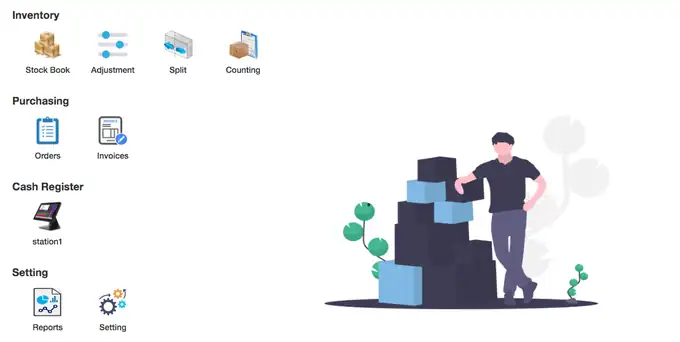
Four tools, one login
Every part of Ginger is one click from the home screen, and the icons follow you to the top of the page so you can jump between them.
Cash register
A fast touch register for the counter or the bar, with split payments, discounts and receipts.
Inventory
Stock book, barcodes, adjustments, case splits and full counts with variance reports.
Purchasing
Vendor orders that turn into invoices, and invoices that update your stock on hand.
Reports & settings
Six sales and inventory reports by date, plus taxes, staff, stations and locations.
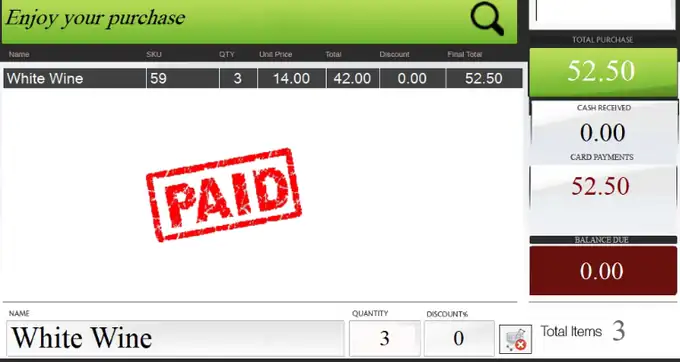
A register your staff learn in minutes
Pick a category, tap the item and it lands in the basket. Tap again for another, or type the quantity. When the customer pays, the balance drops to zero and the sale is stamped paid.
- Split payments. Take part cash and part card on one sale, across as many methods as you need.
- US cash at the till. Ginger works out the US amount to collect from your own exchange rate.
- Discounts per item. Apply a discount to a line and the total updates before payment.
- Manager price overrides. Only managers can change a price, and every change records a reason.
- A clean audit trail. Every sale and every void gets its own invoice number.
- Age check on screen. The register shows the cut-off birth date, which is ideal for liquor stores and bars.
Know exactly what is on the shelf
Ginger keeps your on-hand count right, from the first import to the next count.
Stock book
Find any item by name, SKU, description, category or UPC, including items you no longer carry.
Barcode ready
Scan a UPC and it is saved with its barcode. Add item photos while you are there.
Costs on autopilot
Last cost and average cost update from vendor invoices, with a default margin to guide your shelf price.
Quick adjustments
Record theft or breakage with a reason in seconds, without a full count. A report prints automatically.
Case splits
Break a case into single units and both SKUs update on hand at once.
Counts & variance
Print count sheets, enter what you counted and print a variance report for each sheet.
Purchasing that closes the loop
From order to invoice to shelf, without typing anything twice.
Order by vendor
Build an order, see what you ordered from that vendor before, then print, email or fax it.
Turn it into an invoice
When the delivery arrives, open the same order and enter the invoice. Stock on hand updates right away.
Post only when it balances
An invoice posts only when the discrepancy is zero, so totals and taxes always match the vendor’s paper.
Reports for any date range
Print by day or choose a start and end date.
- Your taxes, your names. Set up GST, PST, liquor tax, service fees and more.
- Manager and staff roles. Managers see every setting, staff only what they need.
- Stations and locations. Add registers and stores as you grow.
- Easy start. Import your first inventory from an Excel sheet.
Built for retail
Ginger fits almost any shop that sells from a counter or a bar.
Lite
Single terminalFor small businesses running one register.
Professional
Multiple terminals & locationsFor small to mid-sized businesses with several registers or stores.
Enterprise
Mid-sized to large chainsFor growing chains that need every location in one system.
See Ginger at your counter
Book a short live demo and we will walk through a sale, a delivery and an end-of-day report using items like yours.
Request a demo Contact us